Bulk Flickr Downloader for PC
Download photos from Flickr in original quality with one click. This Flickr photo downloader saves entire albums, photostreams, and pictures with smart file naming — photographer, date, and title instead of cryptic IDs. The ultimate Flickr image downloader that actually works.
Stop Wasting Time — Download Flickr in Bulk
Downloading Manually
- Click each photo one by one — hours wasted
- Get compressed thumbnails, not originals
- No way to download entire albums
- Files named with cryptic IDs
- Browser extensions break constantly
With NeoDownloader
- One click downloads entire album
- Download images from Flickr in original quality
- Flickr picture downloader — saves albums, photostreams, groups
- Smart file naming with photographer & date
- Desktop app — always works
How to Download Photos from Flickr in Bulk
3 simple steps — no extensions, no accounts, no hassle
Open Flickr in NeoDownloader
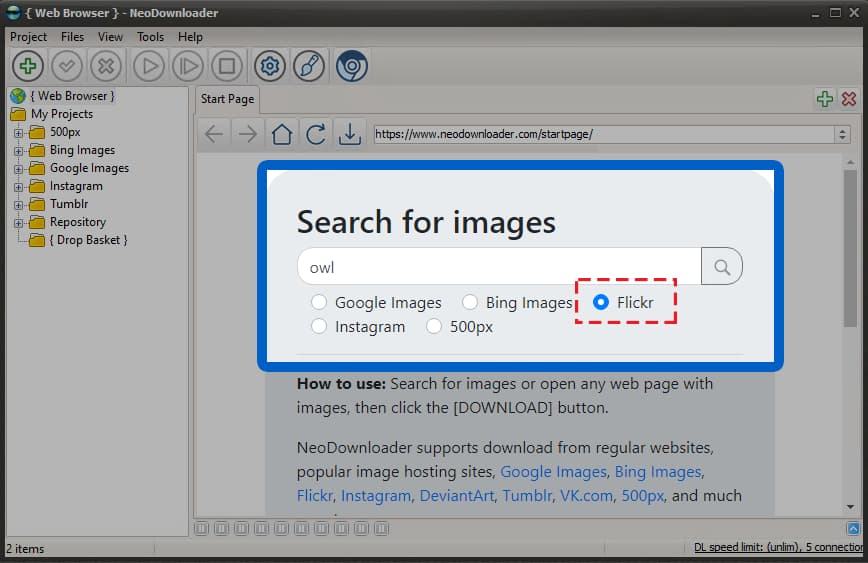
Launch NeoDownloader and select Flickr in the built-in search form. Enter your topic or paste any Flickr album URL directly into the browser to start downloading photos from Flickr.
Browse Albums, Photostreams, or Search Results
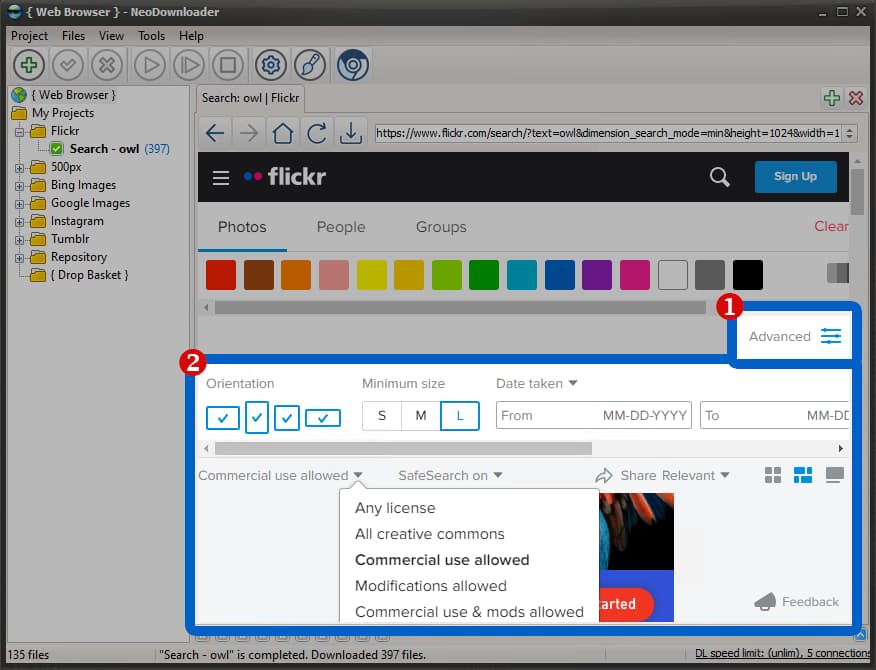
Navigate to any album, photostream, or group pool. Use Flickr's filters for license (Creative Commons), size, and orientation. Scroll to load more photos — this Flickr image downloader handles pages of any length.
Click Download — Done!
Click the download button in the toolbar. NeoDownloader saves all photos in original quality with smart file names — no more cryptic IDs like "51234567890_abc123.jpg". Download pictures from Flickr in full resolution with EXIF preserved.

Click the lightning button to start
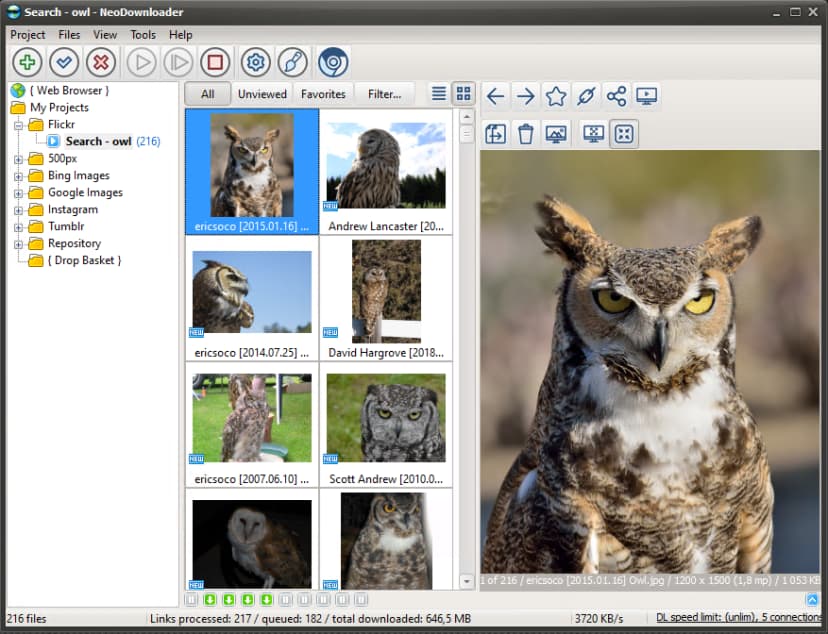
Photos saved with descriptive names
Smart File Naming — Exclusive Feature
Instead of Flickr's cryptic file names, NeoDownloader creates descriptive names automatically when you download Flickr photos:
Flickr's default:
51234567890_abc123def4_o.jpgWith NeoDownloader:
John Smith - 2024-01-15 - Sunset over mountains.jpgFiles include photographer name, capture date, and photo title — making organization effortless. This Flickr photo downloader does the naming work for you.
NeoDownloader Flickr Features
Download from Flickr albums, photostreams, groups, and search results
Album & Photoset Downloads
Download entire Flickr albums with one click. Navigate to any photoset URL, click Download — all photos saved with original organization. This Flickr album downloader handles collections of any size.
Photostream Archives
Save a photographer's complete public photostream. Ideal for Flickr backup before storage limits kick in, or archiving favorite artists. Download Flickr photostream content with smart file naming.
Group Pool Downloads
Flickr Groups contain curated themed collections. Download from group pools like "Street Photography" or "Macro Insects" — mass download images from Flickr groups effortlessly.
Creative Commons Filter
Use Flickr's license filter to find CC-licensed photos. Download only images safe for commercial use or modification. Source URLs saved for proper attribution.
What You Get with This Flickr Downloader
Finding the Original Source
Need attribution info or want to explore more work from a photographer? NeoDownloader saves the source URL for every downloaded image from Flickr.

Click the Link button in viewer toolbar to copy or open the original Flickr page.
Tip: The Flickr source page contains full EXIF data, photographer profile, and specific Creative Commons license details for proper attribution.
Why Choose This Flickr Picture Downloader
Download all photos from Flickr — albums, photostreams, and group pools. Perfect for Flickr account backup before storage limits kick in
Flickr Album Downloader
Download entire Flickr albums with all their photos. Save collections and photosets in bulk — download all photos with one click.
Flickr Photostream Downloader
Download Flickr photostreams from any user. Mass download pictures from photographers you follow with smart file naming. Great for backing up your own photostream.
Original Quality Images
Flickr image downloader that extracts original high-resolution photos (20+ megapixels), not compressed thumbnails. Download pictures from Flickr in full quality with EXIF preserved.
Smart File Naming
No more cryptic IDs like 52847293847.jpg. Files named with photographer, date, and title — John Smith - 2024-01-15 - Sunset.jpg.
Frequently Asked Questions
Is there a free downloader for Flickr?▼
Yes, NeoDownloader is a free desktop app that lets you bulk download photos, pictures, and entire albums from Flickr. The free version allows 100 files per project with no time limit. Download the free Flickr downloader and start saving albums today.
How do I download photos from Flickr?▼
Open the Flickr album or photostream in NeoDownloader's built-in browser, then click Download. The app automatically scrolls and saves all images in original quality — no manual clicking required. For other photo sites, see our Pinterest downloader or Google Images downloader.
How to download Flickr images in bulk?▼
Launch NeoDownloader, navigate to any Flickr album, photostream, or group pool, scroll to load all images, then click Download. You can mass download hundreds of pictures in minutes. This Flickr bulk downloader handles even large albums effortlessly.
How does smart file naming work?▼
NeoDownloader reads Flickr's metadata and names files using photographer username, capture date, and photo title. Instead of cryptic IDs like 52847293847.jpg, you get "John Smith - 2024-01-15 - Sunset.jpg". This happens automatically — no configuration needed.
Can I download an entire Flickr album?▼
Yes. Navigate to the album in NeoDownloader's browser and click the download button. NeoDownloader automatically scrolls through the entire album and saves all photos in original quality. This Flickr album downloader preserves folder structure and original filenames.
Can I download Flickr photostreams?▼
Yes. NeoDownloader works as a Flickr photostream downloader — just open any user's photostream and click Download to save all their public photos with smart file naming. You can download Flickr photostream content from any photographer.
What are the limits of the free version?▼
The free version allows 100 files per project with no time limit. You can create unlimited projects. Premium ($39.95$29.95, one-time) removes all limits and adds HD/4K video support.
Does NeoDownloader preserve EXIF metadata?▼
Yes. NeoDownloader downloads photos in original quality with all EXIF metadata preserved — camera model, settings, GPS coordinates, and more. Download all images from Flickr without losing any data.
Ready to Download from Flickr in Bulk?
Join thousands who use this free Flickr mass downloader to save photos, albums, and photostreams. 100 files per project — free forever.