Bulk Flickr Downloader for PC
Download photos from Flickr in original quality with one click. This Flickr photo downloader saves entire albums, photostreams, and pictures with smart file naming — photographer, date, and title instead of cryptic IDs.
Stop Wasting Time — Download Flickr in Bulk
Downloading Manually
- Click each photo one by one — hours wasted
- Get compressed thumbnails, not originals
- No way to download entire albums
- Files named with cryptic IDs
- Browser extensions break constantly
With NeoDownloader
- One address downloads the entire album
- Download images from Flickr in original quality
- Flickr picture downloader — saves albums, photostreams, groups
- Smart file naming with photographer and date
- Desktop app — always works
How to Download Photos from Flickr in Bulk
3 simple steps — no extensions, no accounts, no hassle
Open Flickr in NeoDownloader
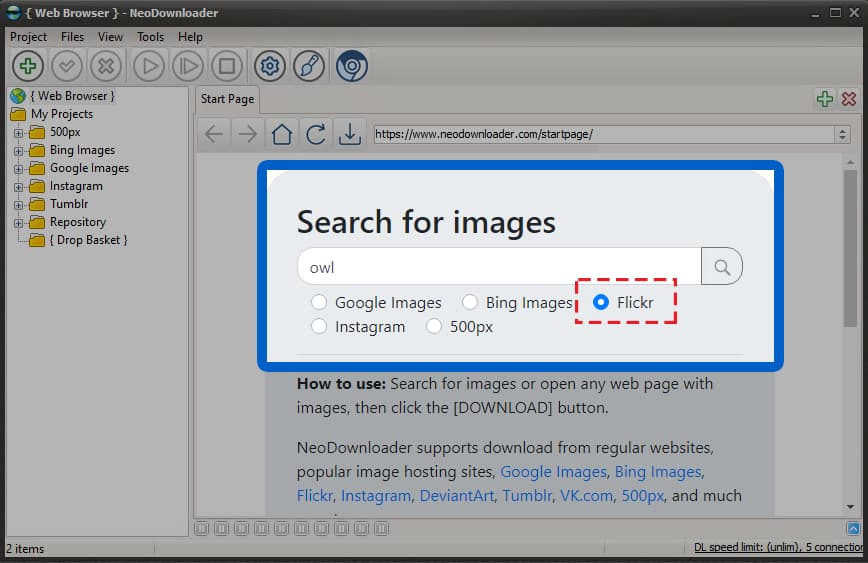
Launch NeoDownloader and select Flickr in the built-in search form. Enter your topic or paste any Flickr album URL directly into the browser to start downloading photos from Flickr.
Browse Albums, Photostreams, or Search Results
Navigate to any album, photostream, or group pool. Use Flickr's filters for license (Creative Commons), size, and orientation. Scroll to load more photos — this Flickr image downloader handles pages of any length.
Click Download — Done!
Click the download button in the toolbar. NeoDownloader saves all photos in original quality with smart file names — no more cryptic IDs. Download pictures from Flickr in full resolution with EXIF preserved.
Smart File Naming — Exclusive Feature
Instead of Flickr's cryptic file names, NeoDownloader builds a descriptive one from the photo's own metadata:
Flickr's default:
51234567890_abc123def4_o.jpgWith NeoDownloader:
John Smith [2024-01-15] Sunset over mountains 51234567890.jpgPhotographer, capture date and title, with the photo id kept on the end so two shots that share a title cannot overwrite each other. Nothing to configure — the recipe carries the pattern.
NeoDownloader Flickr Features
Download from Flickr albums, photostreams, groups, and search results
Album & Photoset Downloads
Download entire Flickr albums from one address — all photos saved with their original organisation. This Flickr album downloader handles collections of any size.
Photostream Archives
Save a photographer's complete public photostream. Ideal for a Flickr backup before storage limits kick in, or for archiving favourite artists.
Group Pool Downloads
Flickr Groups hold curated themed collections. Download from group pools like “Street Photography” or “Macro Insects” in bulk.
Creative Commons Filter
Use Flickr's own license filter to find CC-licensed photos, then download only what is safe for commercial use or modification. The source page is kept for attribution.
What You Get with This Flickr Downloader
- Original quality photos (20+ megapixels)
- Smart file naming with photographer and date
- EXIF metadata preserved (camera, settings, GPS)
- Parallel downloads, with the per-site limit yours to set
- Download all photos from a Flickr album from one address
- Built-in image viewer and organizer
- Source page kept for attribution
- Resume interrupted downloads
Finding the Original Source
Need attribution info, or want to explore more work from a photographer? NeoDownloader saves the source URL for every downloaded image from Flickr.
Click the Link button in the viewer toolbar to copy or open the original Flickr page.
Tip: the Flickr source page carries the full EXIF data, the photographer's profile, and the specific Creative Commons license details for proper attribution.
Why Choose This Flickr Picture Downloader
Albums, photostreams and group pools — useful for a Flickr account backup before storage limits kick in
Flickr Album Downloader
Download entire Flickr albums with all their photos. Save collections and photosets in bulk, from a single address.
Flickr Photostream Downloader
Download photostreams from any user with smart file naming. Good for following photographers, and for backing up your own.
Original Quality Images
Extracts the original high-resolution photo (20+ megapixels), not the compressed thumbnail, with EXIF preserved.
Smart File Naming
No more cryptic ids. Files carry photographer, date and title, and the id stays only as a tiebreaker.
Frequently Asked Questions
Is there a free downloader for Flickr?
Yes, NeoDownloader is a free desktop app that lets you bulk download photos, pictures, and entire albums from Flickr. The free version allows 100 files per project with no time limit. Download the free Flickr downloader and start saving albums today.
How do I download photos from Flickr?
Open the Flickr album or photostream in the built-in browser, then click Download. The app automatically scrolls and saves all images in original quality — no manual clicking required.
How to download Flickr images in bulk?
Launch NeoDownloader, navigate to any Flickr album, photostream, or group pool, scroll to load all images, then click Download. You can mass download hundreds of pictures in minutes. This Flickr bulk downloader handles even large albums effortlessly.
How does smart file naming work?
NeoDownloader reads Flickr's metadata and names files using photographer username, capture date, and photo title. Instead of cryptic IDs, you get a readable name. This happens automatically — no configuration needed.
Can I download an entire Flickr album?
Yes. Navigate to the album in the built-in browser and click the download button. NeoDownloader automatically scrolls through the entire album and saves all photos in original quality. This Flickr album downloader preserves folder structure and original filenames.
Can I download Flickr photostreams?
Yes. NeoDownloader works as a Flickr photostream downloader — just open any user's photostream and click Download to save all their public photos with smart file naming.
What are the limits of the free version?
The free version allows 100 files per project with no time limit. You can create unlimited projects. Premium ($29.95, one-time) removes all limits and adds HD/4K video support.
Does NeoDownloader preserve EXIF metadata?
Yes. NeoDownloader downloads photos in original quality with all EXIF metadata preserved — camera model, settings, GPS coordinates, and more. Download all images from Flickr without losing any data.
Ready to Download from Flickr in Bulk?
Join thousands who use this free Flickr mass downloader to save photos, albums, and photostreams. 100 files per project — free forever.